 Brainerce Help
Automation history, skipped and failed runs
How to read an automation's history, what Updated, Skipped, Failed, Needs review and Waiting to retry mean, a table of every common skip and error reason in plain words, and which problems ring the bell.
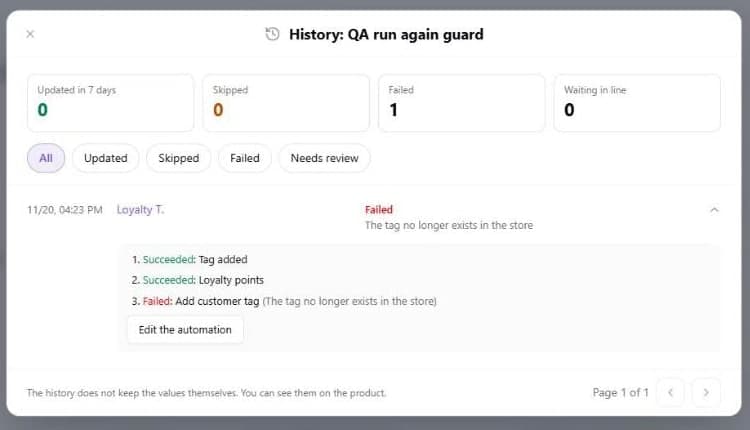
Every time an automation starts, Brainerce records a run. Open Settings → Automations, click the row menu ⋮ and choose History to see them. The tiles at the top count Updated in 7 days, Skipped, Failed and Waiting in line, and the filter Filter by result narrows the list to Updated, Skipped, Failed or Needs review. Click a run to see its steps. The history never keeps the values themselves (no email address, no note), only what happened.
What each result means
| Result in the history | What it means |
|---|---|
| Updated | The actions ran. |
| Skipped | Nothing was done on purpose, for a business reason. This is not an error. Examples: the condition was not met, the customer did not agree to marketing emails, the order is not in a state that allows the change. The reason is shown beside it. |
| Failed | Something went wrong and the run stopped. The reason is shown. Fix it, then use Run again. Run again does not repeat what already worked. If the run already added loyalty points, changed stock, created a coupon or created a purchase order, Run again skips those steps and carries on with the next one, so a customer is not given the points twice. This holds only while that step is unchanged: if you edited the step that added the points, stock, coupon or purchase order after the run, Run again is refused, because Brainerce cannot tell an edit from "do it again". Run again is also not offered when the run already emailed the customer or sent a request to another system, because that would reach the person a second time. In both cases fix the cause and wait for the next event, or finish the remaining step by hand. |
| Needs review | Brainerce is not certain whether the run already acted, for example after an interruption. Check the order, product or customer yourself before running it again. |
| Waiting to retry | A temporary problem. Brainerce tries again by itself, with growing pauses, and fails the run if it keeps happening. |
| Waiting in line / Running | Not finished yet. |
| Waiting (with "Continues on ...") | A Wait step is running. |
| Cancelled | You paused with Pause and cancel waiting runs, or the automation was paused because its owner lost a permission. Nothing was written. |
A run whose condition was false shows Skipped with "The condition was not met". Do not read it as a fault. It means the order, product or customer was not one you asked about.
Skip reasons (the run did nothing, on purpose)
| What the history says | Code | What it means and what to do |
|---|---|---|
| The condition was not met | CONDITION_NOT_MET | Your filter did not match. Normal. |
| A newer change replaced this run | SUPERSEDED | Something changed again before the run started (for example stock moved after the event), so the old decision was dropped. |
| The order no longer exists in the store | ORDER_NOT_FOUND | The order was deleted, for example during a wait. |
| The cart no longer exists in the store | CART_NOT_FOUND | The cart was cleaned up during a wait. |
| The product no longer exists | PRODUCT_NOT_FOUND | Deleted before the run reached it. |
| The order has no customer (a guest order), or the customer no longer exists | CUSTOMER_NOT_FOUND | An action that needs a customer cannot act on a guest order. |
| The customer's data was deleted at their request | SUBJECT_ERASED | A privacy erase. Nothing is ever done for that customer. |
| The customer has no email address | NO_CUSTOMER_EMAIL | A guest order, for example. |
| The customer did not agree to receive marketing emails | NO_MARKETING_CONSENT | A marketing email only goes to customers who agreed. This is a rule, not a bug. |
| The address asked not to receive emails, or bounced | SUPPRESSED | The customer unsubscribed, the address bounced or they marked it as spam. |
| This customer already got an email from this automation recently | FREQUENCY_CAP | The "At most one email per customer every N days" limit. |
| The template reads like an offer, so it can only be sent as a marketing email | PROMOTIONAL_CONTENT | An email about the order cannot carry an offer or discount code. Send it as Marketing or change the template. |
| The email prints an order field that has no value on this order yet | ORDER_FIELD_EMPTY | Nothing is sent half empty. Fill the field or change the template. |
| The template is no longer in the library | TEMPLATE_NOT_FOUND | Pick another template. |
| The store has no postal address for the email footer | NO_POSTAL_ADDRESS | Add a business address in the email settings. Marketing email needs one. |
| Emails are switched off for this store | EMAILS_DISABLED | Switch emails on again in the email settings. |
| Marketing emails are on hold across the platform right now | MARKETING_ON_HOLD | Delivery reports from the email provider are not arriving, so Brainerce holds marketing mail back. Nothing to fix on your side; try again later. |
| The store's own abandoned checkout recovery emails are on, so this reminder was not sent a second time | RECOVERY_EMAIL_ACTIVE | Turn the recovery emails off, or do not email the shopper from the automation. |
| None of the chosen team members can receive the email | NO_RECIPIENTS | They left the team or lost the permission. Choose again. |
| Nothing to report, so no email was sent | NOTHING_TO_REPORT | A report table with no rows sends no email. Good news, not a fault. |
| The order cannot be changed (for example it is cancelled, refunded or imported, or already has 100 tags) | ORDER_NOT_WRITABLE | Also what stops a cancel of an order that is already paid: cancel never refunds, so it leaves the order alone. |
| Only an order that is Pending or Processing can be put on hold | ORDER_NOT_HOLDABLE | Left as it is. |
| Only a finished order can be archived | ORDER_NOT_ARCHIVABLE | Cancelled, refunded, completed, fulfilled or delivered only. |
| The field is not one of the active order fields of the store | ORDER_FIELD_NOT_FOUND | Nothing was written. Turn the field back on or pick another. |
| The value is missing or the field does not accept it | ORDER_FIELD_REFUSED | Nothing was written. |
| The coupon no longer exists / has expired | COUPON_NOT_FOUND, COUPON_EXPIRED | An expired coupon is not turned on again. |
| The discount rule no longer exists | DISCOUNT_RULE_NOT_FOUND | Pick another rule. |
| The stock of this item is not tracked | STOCK_NOT_TRACKED | The count is left as it is. |
| The stock is kept in several warehouses | STOCK_PER_WAREHOUSE | A single count would be undone by the next warehouse edit, so it is left alone. |
| The count could not be changed (below what is already reserved, or a kit) | STOCK_NOT_WRITABLE | Left as it is. |
| No supplier was chosen and the item does not have exactly one supplier | PO_NO_SUPPLIER | Add the supplier on the product, or pick one in the action. |
| The chosen supplier no longer exists or is switched off | PO_SUPPLIER_NOT_FOUND | Pick another. |
| A purchase order for this item is already open | PO_ALREADY_OPEN | No second draft is stacked. |
| This item cannot be ordered | PO_ITEM_NOT_ORDERABLE | A kit, or no longer in the store. |
| The store has no active loyalty club | LOYALTY_NOT_ACTIVE | Switch the club on to give points. |
| The customer is not a club member | LOYALTY_NOT_MEMBER | An automation never enrols anyone. |
| The connection was deleted / is paused | HTTP_CONNECTION_NOT_FOUND, HTTP_CONNECTION_DISABLED | Resume it or choose another. |
| Automations are not included in this store's plan | PLAN_NOT_INCLUDED | Upgrade the plan. |
| The plan's automation actions for this billing period are used up | PLAN_QUOTA_REACHED | Upgrade, or wait for the next billing period. Runs resume by themselves. |
| The value is empty, was deleted, or is not in the table | EMPTY_SOURCE, SOURCE_REMOVED, NO_MATCH, AMBIGUOUS_MATCH | A table lookup found no single answer, so the field was left as it was. |
Failure reasons (the run stopped with a problem)
| What the history says | Code | What to do |
|---|---|---|
| The person who turned it on lost a permission it needs | PERMISSION_REVOKED | Someone with the permission turns it on again. |
| The tag no longer exists in the store / the category no longer exists | TAG_NOT_FOUND, CATEGORY_NOT_FOUND | Create it again or edit the automation. |
| The price was not changed because the price rules do not allow it | PRICE_REFUSED | For example the sale price was not lower than the price, or the product is a kit. |
| The weight was not changed: a kit has no weight of its own | WEIGHT_REFUSED | |
| The value from the table does not fit the field type | INVALID_VALUE | |
| The coupon could not be created (no free code) | COUPON_ISSUE_FAILED | Nothing was created. Run again. |
| The action is no longer available | CONTRACT_RETIRED | Edit the automation. |
| The system answered with an error status | HTTP_RESPONSE_NOT_OK | The other system refused. Check it and Run again. |
| The address is not allowed (a private or internal address) | HTTP_BLOCKED, HTTP_URL_REFUSED | Use a public https address. |
| The system did not answer in time / could not be reached | HTTP_TIMEOUT, HTTP_UNREACHABLE | Check the other system. |
| The store was suspended before the call | HTTP_STORE_INACTIVE | |
| Failed after several retries | RETRIES_EXHAUSTED | A temporary problem lasted too long. Run again. |
| The run was stopped because it took too many steps | STEP_BUDGET_EXCEEDED | Make the automation smaller. |
| It is not certain whether the update happened. Check the product | UNKNOWN_OUTCOME | Check the record, then decide. |
| It waited too long in line and was not run | MAX_LATENESS | Too old to run safely. |
| A temporary conflict / error. It will be retried | UNIQUE_CONFLICT, DB_UNAVAILABLE, LOCK_TIMEOUT | Nothing to do. |
If the history shows a code that is not in this table, it appears as "Reason code: ...". Use the code when you contact support.
Which problems ring the bell
Brainerce tells your team in the dashboard bell about problems you can fix, and stays quiet about the normal ones:
- An automation cannot run (once a day): a deleted email template, no postal address, emails switched off, a deleted or paused connection, a deleted or expired coupon, a deleted discount rule, stock kept in several warehouses, a missing supplier for a purchase order, or no active loyalty club.
- An automation needs attention (once a day): runs Failed or Needs review today.
- An automation was paused: its owner lost a permission, or a step was retired.
- A table lookup found no match (when you chose "Leave it and notify me").
- An automation email was not sent: none of the chosen team members can receive it.
A skip that concerns one customer or one order never rings the bell: no marketing consent, no email address, a frequency limit, a guest order, a condition that was not met. They would be noise. They only show in the history.