 Brainerce Help
Best-sellers report
See which products bring in the most revenue, and spot what to restock or promote.
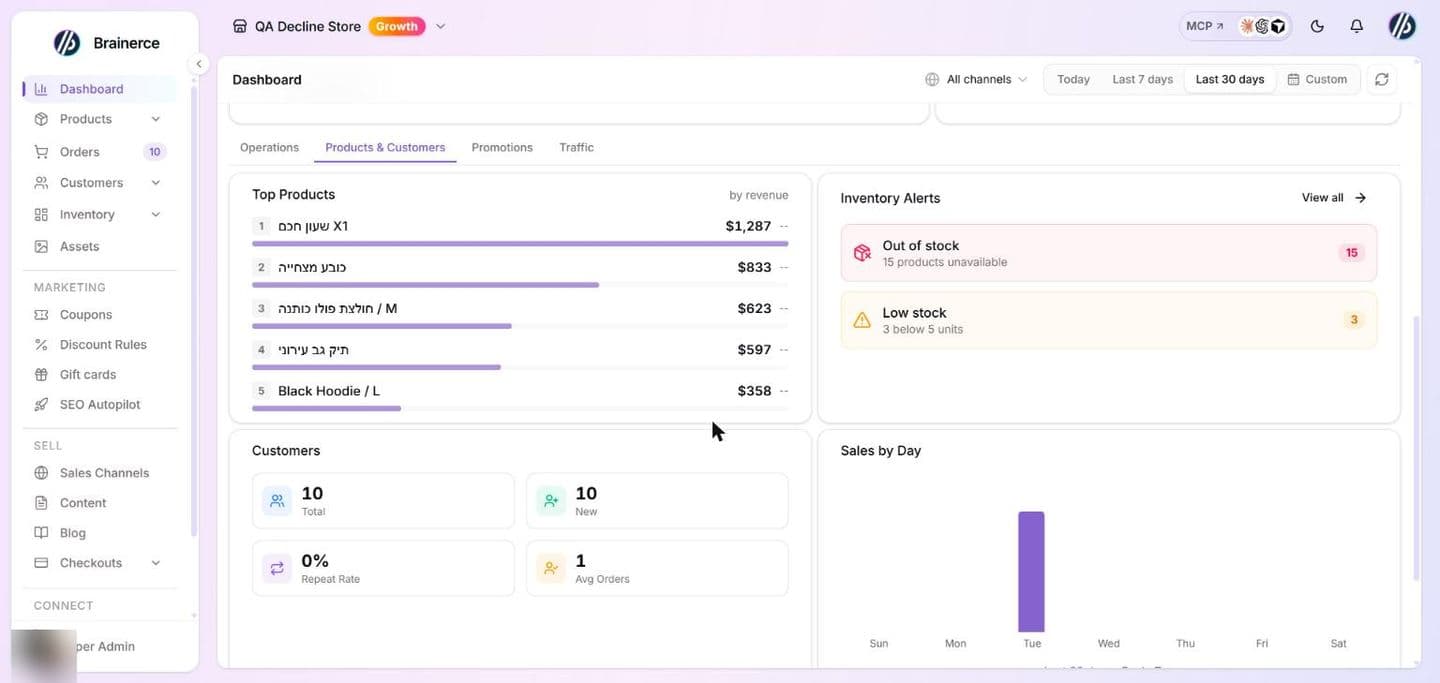
Find your top products on the Dashboard. Open it from the sidebar, choose a period at the top, then open the Products & Customers tab.
Top products
The Top Products card lists your top five products for the selected period, ranked by revenue, with the amount each one brought in and its profit margin beside it. Change the period at the top of the Dashboard (Today, Last 7 days, Last 30 days, or a custom range) and the ranking updates.
What "revenue" means on this card
It is the product's own line total, its price multiplied by the quantity sold, added up across the period. Three things follow, and they are the reason this card will not add up to the Revenue figure on the Operations tab:
- Shipping is not counted. Delivery charges belong to the order, not to any product, so they never appear here.
- Only paid orders count. Unlike the Revenue card, an order awaiting a bank transfer or marked cash-on-delivery is left out of Top Products until it is marked paid. Cancelled, refunded and test orders are excluded from both.
- The period is a rolling window, counted back from right now. "Last 7 days" is the last 168 hours, not last calendar week.
The ranking is by money, not by units, and the card shows five products. A single expensive item can outrank one that sold ten times as many pieces, and units sold are not shown here at all, so do not read this card as a restocking list. The green/red badge beside each amount is that product's profit margin; -- means you have not set a cost price on it.
Very large stores: this card reads at most 10,000 orders from the selected window. Above that, pick a shorter period or the ranking will be based on a partial slice with no warning on the page.
Also on this tab
The Products & Customers tab puts best-sellers alongside the context you need to act on them:
- Customers. New vs. returning, repeat-purchase rate, and average orders per customer. Only the new-customer count follows the selected period (customers created in it). Returning customers, repeat-purchase rate and average orders per customer are lifetime figures across your customers, so they do not change when you switch the period, and they are not narrowed by the channel selector. A returning customer is one with more than one order of any kind.
- Inventory alerts. How many products are low or out of stock. This one reads your stock as it is right now, not the selected period.
- Sales by day. Which day of the week sells best, using your store's own days (set the Timezone under Settings → General). Only paid orders count. It follows the period selected at the top (Today, Last 7 days, Last 30 days, or a custom range), and the line under the chart names the period it covers. With Today selected only today's orders are counted, so most weekdays show zero.
- Cohort Retention. For each of the last 6 months, how many first-time buyers came back and bought again within 30, 60 and 90 days. A month that is younger than the window shows a note that the rate is still growing. Orders that are not linked to a customer record are left out. Only paid orders count, and test, cancelled and refunded orders do not. Until you have enough order history it says so instead of showing a table.
Put it to work
- Make sure your top sellers stay in stock. See Adjust stock.
- Feature them in a promotion. See Coupons and discounts.
What's next?
Need help reading your reports? Email [email protected].