 Brainerce Help
Birthday gifts
An automatic gift coupon emailed ahead of each customer's birthday, the highest-converting email most stores ever send.
A birthday email with a real gift inside consistently outperforms every promotional email: it's personal, it's expected, and it lands on an occasion the customer is already thinking about. Brainerce automates the whole thing.
Every gift coupon has an expiry date that you choose, and you cannot turn the birthday gift on without one. See "How long the gift stays valid" below.
Turn it on
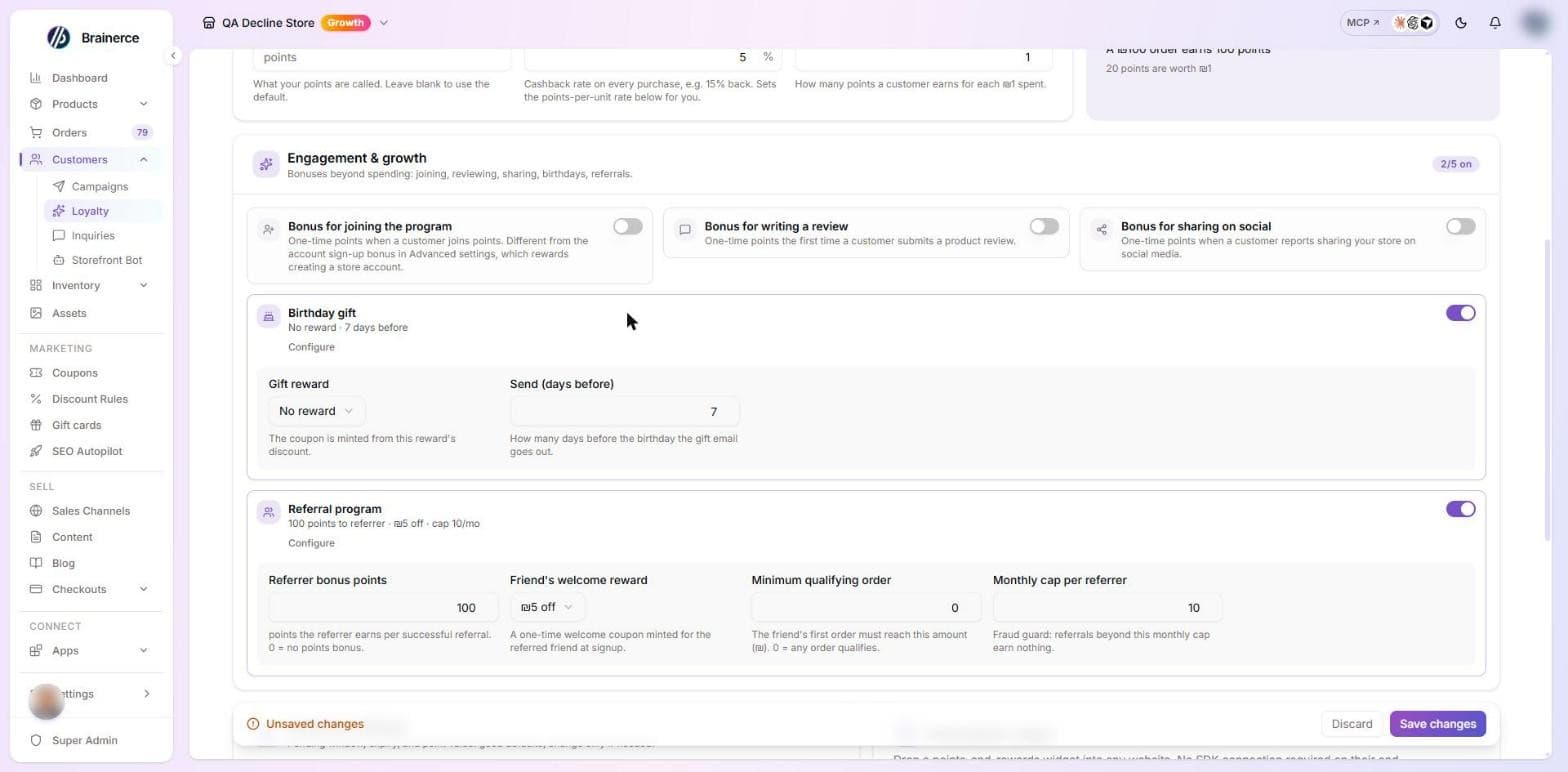
Open Customers → Loyalty → Settings → Engagement & growth → Birthday gift:
| Setting | What it does |
|---|---|
| Gift reward | A reward from your catalog. The gift coupon is minted from its discount, and from its maximum discount if it has one. |
| Send (days before) | How many days ahead of the birthday the gift is created and the email goes out, 0 to 31 (default 7). |
| Gift is valid for | Required. Until the end of the birthday month, or 7, 14 or 30 days from the birthday. The coupon stops working at the end of the last valid day, on your store's calendar. |
The Gift reward list reads No reward until you choose one, and it only offers rewards you have already created in the Rewards tab. For the gift, create the reward with Who can get it set to Gift only, so members cannot also buy it with points. See Building the reward catalog.
With no reward chosen, or with the chosen reward switched to inactive or deleted, or while the program is not Active, nothing is minted or sent. If the reward is switched off or deleted, the Birthday gift tile shows a warning until you pick a live one.
Gift is valid for is required. Until you choose it, the Save button stays disabled and the field is marked, and a program that has the birthday gift on and no validity cannot be saved at all. A birthday gift that never expires is a discount you can never close, so Brainerce does not offer one.
That's the entire setup. No campaign builder, no scheduling.
How it works
- A birthday lands on the customer record. Month and day only, never a year, so you are not holding anyone's age. It can come from the customer on your storefront, from your own typing in the dashboard, or from a file you import (see "Where a birthday can come from" below).
- Every morning at 06:00 UTC, Brainerce finds the members of your loyalty program whose birthday enters the send window, on your store's calendar. A customer who is not a member of your program gets no gift, whatever their birthday says.
- Each one gets a one-time coupon minted from your chosen reward, with the expiry you chose. If they accepted marketing, they also get it in a birthday email, in their own language, using your store's branding. You can customize the template under Settings → Email templates (event: Birthday reward). The email states the expiry date and the maximum discount.
- The coupon works at checkout across your sales channels, until its expiry date.
Where a birthday can come from
Four routes, all of them filling the same field on the customer record. It is month and day only, with no year anywhere.
| Route | Where |
|---|---|
| The customer fills it in | The account page on your storefront, which can now show the birthday they already gave you rather than an empty box. |
| The customer gives it at sign-up | Your storefront's registration form. You can make it compulsory there on channel-connected storefronts, and only for email and password sign-up: see "Ask for a birthday at sign-up" below. |
| You type it in | Open the customer in Customers and set the birthday on their record. |
| You import it | Customers → Import, from a customer file with birth_month and birth_day columns. |
Having a birthday on file is not the same as being reachable. Whichever route it arrived by, the gift email only goes to customers who accepted marketing. A member who did not accept marketing still gets the coupon created for them, but nothing is emailed, so they will not know it exists unless your storefront shows them their coupons.
Add or change a birthday in the dashboard
Click a customer in Customers to open their record, set the birthday, and save. Use it to fix a typo, or to record a birthday a customer gave you by phone or in the shop.
It is month and day only. There is no year field, so you cannot store a customer's age or date of birth here, and nothing in Brainerce works out how old anyone is.
Adding a birthday sends nothing immediately. That customer simply joins the next nightly run, and gets the gift only if they are a member of your loyalty program, and the email only if they accepted marketing.
Import birthdays from a spreadsheet
Customers → Import reads the birthday along with the rest of the customer file. The Export in the ⋮ menu of the table's last column writes it back out, so export, edit in a spreadsheet, re-import keeps birthdays. The quick export you get by ticking customers in the list is a different, shorter file with no birthday column; see View and edit a customer profile.
Two things hold whatever format your file uses. A birthday Brainerce cannot read never fails the row: that customer is imported without a birthday, and the import preview shows a warning naming the cell, so you can correct it and import again. And importing a birthday does not opt anybody into marketing, so imported customers who never consented still get no gift email.
The two columns to use: birth_month and birth_day
Put the birthday in two separate columns of plain whole numbers, birth_month (1 to 12) and birth_day. That is exactly what a Brainerce export writes, so the safest file to import is one you exported and edited.
Two columns instead of one date column is deliberate. Excel and Google Sheets quietly retype a cell like 04-17 into a date and write it back reformatted, which is the same data loss one layer down.
Both numbers have to be there. A row with a month and no day, or a day and no month, has no usable birthday and will never earn a gift.
The day has to exist in that month. 29 February is accepted, and is celebrated on 28 February in non-leap years. 30 February is refused, because there is no such day.
One combined date column, and why day-first dates get refused
A single combined column is also read, under any of these headers: birthday, birth_date, birthdate, date_of_birth or dob. It can hold MM-DD, MM/DD, YYYY-MM-DD or a full date. Any year in it is read and then thrown away, because only the month and the day are ever stored.
Day-first dates are refused rather than guessed at. Brainerce refuses any full date whose day could just as easily be read as a month, instead of choosing between 4 May and 5 April, because choosing wrong sends the gift on the wrong day. A file written in the day-first order most of Europe uses hits this on a large share of its rows.
A date with no year is always read month first. In a two part cell, 04-17 is 17 April. 17-04 is not 17 April, it is month 17, so it is refused. This catches day-first files even where the numbers look unambiguous to a person.
For either problem the answer is the same: give the file the two birth_month and birth_day columns instead. A refused date never fails the row. The customer imports without a birthday, and the import preview warns you which cell to fix.
Ask for a birthday at sign-up
You can require a birthday when someone creates an account on your storefront. The setting is Require Birthday in that storefront's sales-channel settings, directly under Require email verification, and it is off by default.
Read the limits before you switch it on, because they are narrow:
- It only affects new sign-ups. Customers who already have an account are never asked. Nothing goes back and collects the birthdays you missed, and Brainerce sends no email asking an existing customer for one.
- It only applies to storefronts connected as a sales channel. A storefront that connects with a plain store ID has no sales channel to read the setting from, so the birthday stays optional there however you set the switch. This is exactly the same limitation Require email verification has.
- It only covers email and password sign-up. "Continue with Google" and the other social sign-ins create the account on a different route that never looks at this setting, and neither does an ordinary guest checkout. So a storefront with the toggle on has a gated password form sitting next to an ungated social button, and customers keep arriving without a birthday. Never build reporting on the assumption that every new customer has one.
- It is still month and day only. No year, so it is not an age check and cannot gate anything by age.
- A birthday collected at sign-up earns a gift only if that customer is a member of your loyalty program, and the gift email only if they also accepted marketing.
Email everyone whose birthday is this month, or on one date
The automatic gift is one email per customer, sent a set number of days ahead. For a separate one-off promotion aimed at the month's birthdays, the short way is the Birthdays this month card on Customers → Campaigns: press it and the email opens with that audience already chosen, with a live count of how many customers it matches. No filtering, and nothing to set up. See Email campaigns.
The longer route still works and is the one to use when you want a single date rather than the whole month, because the card covers the month only. Open Filter on the Customers list, choose the month under Birthday month, then start a campaign from that filter: a campaign started from the Customers list takes whatever the list is filtered to as its audience.
Turn on Birthday day in the same Filter menu to narrow that to a single date, such as 17 April, which is what you want for a greeting that goes out on the day itself. Both filters are off until you switch them on in the Filter menu, and each customer's birthday is shown in the Birthday column of the list so you can check who is in it before sending. Set the day on its own and it means that day in every month, which is rarely what anyone wants.
Either way, you can send it the moment you confirm, or schedule it on the confirmation step for the morning you want it read, up to 90 days ahead in your store's time zone. The audience is worked out again at send time, so a campaign filtered to a single birthday date still reaches exactly the people with that birthday, including anyone who joined after you booked it. See Can I schedule a campaign to send later?.
That campaign is an ordinary marketing email, so the ordinary rules apply: only customers who accepted marketing are mailed, and nothing sends at all until your business postal address is set.
How long the gift stays valid
You choose this under Gift is valid for, and it is required. The coupon is created with that expiry, and the checkout refuses it after that.
| You choose | The coupon stops working |
|---|---|
| Until the end of the birthday month | At the end of the last day of that month, on your store's calendar. |
| 7, 14 or 30 days from the birthday | At the end of that day, counted from the birthday itself, on your store's calendar. |
The deadline is the end of a whole day in your store's time zone, not midnight in some other zone. A coupon valid until 31 March works all through 31 March at your shop.
- It is locked to that customer. The code works only for the person whose birthday it was. Forwarding it to a friend does nothing, so a birthday code that leaks is not an incident.
- It can be used once.
- Changing the setting later does not touch coupons already created. A coupon keeps the expiry it was created with. A new choice applies to the gifts created from then on.
- The maximum discount travels with the coupon. If your gift reward is "30% off, up to $150", the coupon never takes off more than $150, however big the order is.
Before this setting existed, birthday coupons never expired. Gifts created in that period still have no expiry date, and Brainerce does not add one afterwards.
Good to know
- Once a year, guaranteed. A member can never receive two birthday gifts for the same birthday, even if their date sits inside the window for several nights, and even when the window crosses New Year (a 2 January birthday found on 28 December counts as next year's gift, and the 1 January run does not create it again).
- Gift for members, email for people who agreed. Only members of your loyalty program get a gift. The email only goes to those who accepted marketing. A member who did not accept still has the coupon, but is not emailed.
- A failed email is tried again. If the email cannot be sent, Brainerce retries it on the next nightly runs, up to 5 attempts in all, and never creates a second coupon. After the fifth failure it gives up on that email and the member keeps the coupon.
- A member who unsubscribes between the coupon and the email is not emailed. Marketing consent is checked when the email is sent, not when the coupon was created.
- February 29 birthdays are handled: in non-leap years they're celebrated on February 28.
- The email only goes to customers who actually provided a birthday, so the more your storefront encourages filling it in ("add your birthday, get a gift 🎁"), the more this feature does.
- A birthday you typed in or imported counts exactly the same as one the customer entered themselves. The email still requires their marketing consent.
Storefront requirement
Collecting the birthday is one profile field (month and day, no year) on your storefront's account page. Your storefront can also read the saved birthday back and show it, so a customer who already filled it in sees it there instead of an empty box, and it can ask for the birthday on the sign-up form as well. Developers: see the integration guide.
You are not dependent on the storefront for this. A birthday you type into the customer record, or import from a file, works exactly the same and earns the same gift, as long as that customer is a member of your loyalty program, and the same gift email if they accepted marketing.
Referral program
Members share a personal code, friends get a welcome coupon, and the referrer earns points after the friend's first order, with fraud protection built in.
Overview
How promotions work in Brainerce, covering coupons vs automatic discount rules, when to use each, and a map of every article in this section.