 Brainerce Help
Plans
Compare Brainerce plans and pick the one that fits your stage.
Brainerce has four plans so you can start free and upgrade only as your store grows. Billing is per store: each store you run has its own plan and its own subscription, so you can keep one store on Free while another is on a paid plan.
Every plan includes the full commerce engine: products, variants, inventory, checkout, orders, refunds, customers, taxes, discounts, analytics, shipping, email, webhooks, API keys, and every payment gateway in the app store. Higher plans raise your limits (orders, sales channels, team members, AI credits, storage) and unlock premium AI features.
At a glance
| Plan | Who it's for |
|---|---|
| Free | Trying Brainerce or running a very small catalog. No credit card required. |
| Pro | A real online store: unlimited products and pay-as-you-go order overage. |
| Growth | Higher volume and multi-channel sellers who need more storefronts, team seats, and AI. |
| Enterprise | Custom limits, an SLA, and a dedicated success manager; terms are agreed with sales. |
For the exact numbers (orders, sales channels, team members, AI credits, storage, and prices) see Plans & limits. You can compare every feature side by side on the pricing page.
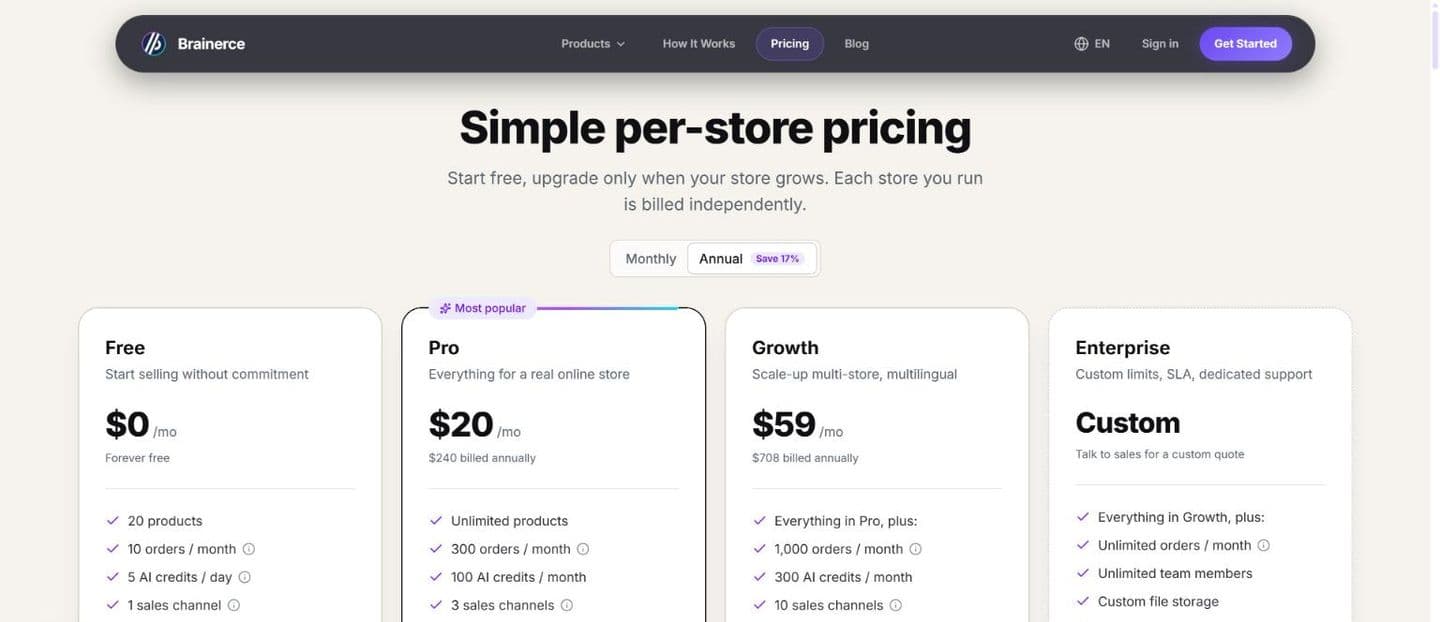
What's in every plan
No matter which plan you're on, you always get:
- Full commerce engine: products, variants, inventory, checkout, orders, and refunds.
- Every payment gateway in the app store. Connect Stripe, PayPal, Cardcom, Grow, Morning (Green Invoice), Sola, Takbull or Rivhit (iCredit); Brainerce takes no cut of your sales.
- Storefront SDK to connect an AI-built storefront (Lovable, v0, Cursor, Bolt, Claude, or custom code) as a sales channel.
- Customers & accounts: guest checkout, customer accounts, addresses, and order history.
- Discounts & marketing: coupon codes, automatic discount rules, order bumps, and product bundles.
- Shipping: flat-rate and weight-based rates, shipping zones, and shipment tracking, on every plan. Real-time carrier rates and printed labels are not built in. They come from a shipping app. Install Shippo or EasyPost from Apps, connect your own account there, and live quotes appear at checkout alongside your own rates. HFD and Cheetah (deliveries in Israel) have no live quotes: you price them with your own zones and rates, and Brainerce creates the delivery and tracks it. Those carriers bill you directly for labels; Brainerce does not resell them, and there is no Carriers page in Settings.
- Email: order confirmation, shipment notifications, abandoned cart emails, custom templates, and custom sending domain.
- Analytics: revenue trends, conversion tracking, orders by status, and AI usage analytics.
- Developer tools: outbound webhooks, API keys, and manual CSV/JSON export.
- Test mode to take end-to-end test orders before you go live.
What changes between plans
The differences are about scale and premium AI features, not the core commerce features:
- Higher limits: more orders, sales channels, team members, AI credits, and storage on each step up. Paid plans never hard-stop on orders; extra orders are billed per order instead: $0.30 each on Pro and $0.20 each on Growth (in Israel ₪1.00 and ₪0.65). The Free plan blocks checkout at its limit instead.
- AI image and video generation: AI image generation and editing on Pro and above; AI video generation on Growth and above. (Every plan already includes AI product descriptions, the store assistant, AI email writing, and AI translation.)
- Enterprise controls: a 99.9% uptime SLA, a dedicated success manager, priority support, and custom integrations on Enterprise. Anything beyond the shipped feature set, including a single-sign-on arrangement for your dashboard users, is scoped with sales as part of the contract, not switched on from the plan picker.
The AI storefront chat widget is not one of the differences: the AI shopping assistant you embed on your storefront is available on every plan, Free included. What limits it is your AI credit allowance: each shopper reply costs 1 credit from the same monthly pool as the rest of the assistant, so a Free store's 30 credits a month (and 5 a day) is the real ceiling.
See exactly what each plan unlocks in the full comparison on the pricing page.
How billing works
- Billed monthly or annually, and annual saves about 17% to 20% versus paying monthly.
- Charged automatically to the card you add under Settings → Billing.
- Prorated upgrades: switch up any time and pay only the difference for the rest of the period. You see the exact amount and confirm it before your card is charged.
- Moving to a cheaper paid plan waits for the end of the period. Growth to Pro, for example, is booked for the date your current period ends. You keep Growth and all of its limits until then, nothing is charged or credited, and you can take the switch back from Settings → Billing before it lands. There is no mid-period downgrade and no refund for the unused part of the higher plan. Your data is never deleted; the store simply moves to the lower plan on that date.
- Cancelling to Free waits as well. There is no "Switch to Free" option in the plan picker. You cancel the subscription, and your store keeps its paid plan until the end of the period you already paid for, then drops to Free.
- Only the account owner can change the plan. Managers, Staff and Viewers do not see Settings → Billing in their menu at all, and no permission adds it. See who can change the plan or the card.
See Upgrade your plan for the step-by-step, including how proration works.
Choosing a plan
- Just exploring or building? Start on Free, which is enough to launch a real store, connect any payment gateway, and take test orders.
- Already selling? Pro unlocks unlimited products, full AI image tools, and pay-as-you-go orders. (The AI storefront chat widget is not a Pro unlock; it runs on Free too.)
- Scaling up? Growth adds more storefronts and team seats, AI video generation, and higher AI-credit and order limits.
- Custom needs or compliance? Talk to sales about Enterprise at [email protected].
Not sure? Start on Free. Upgrading later takes one click in Settings → Billing, and no data is lost.
Next steps
- Plans & limits has the exact numbers
- Upgrade your plan
- AI credits
- Sign up & log in to continue setting up your store