 Brainerce Help
Branding and appearance
Upload your logo and set brand colors used across your emails, customer-facing pages, and invoices.
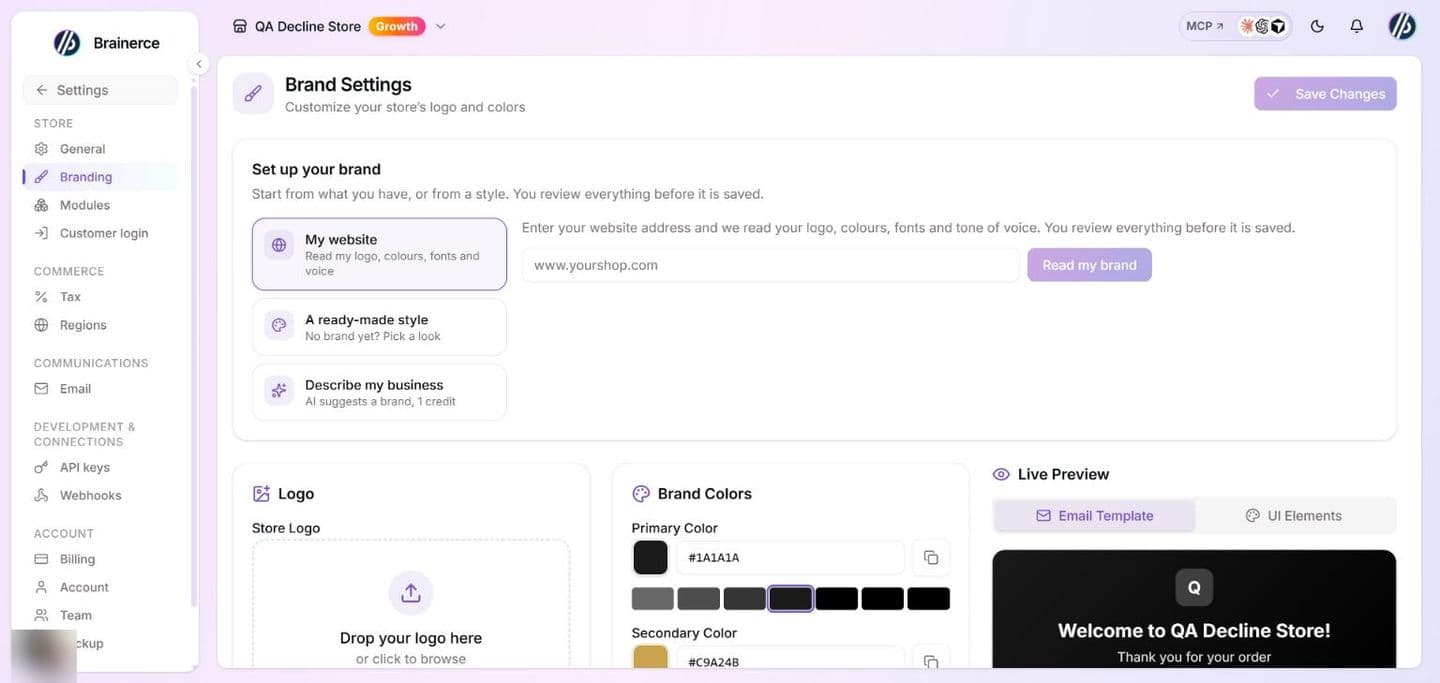
Set your store's look under Settings → Branding. Your logo and colors are applied automatically wherever Brainerce shows your brand. The page needs the Manage store settings permission (Owner and Manager have it by default); Staff and Viewer do not see it in their Settings menu.
Set up your brand
At the top of Settings → Branding, Set up your brand gives you three ways to start. Every one of them ends in the same review, where you choose what to keep. Nothing is saved until you press Save on the page (or, in the quick setup described at the end of this section, until you press Use these).
- My website: Brainerce reads your logo, colors, fonts and tone of voice from your site (below). If a sales channel has a storefront address, it is already filled in.
- A ready-made style: no brand yet? Pick one of six looks (Elegant, Playful, Minimal, Warm, Bold, Natural). Each fills in two colors, two fonts and a tone of voice. Every font in these styles has Hebrew letters. It uses no AI and no credits.
- Describe my business: write a sentence or two about your business (from 8 up to 400 characters) and AI suggests colors, fonts and a tone of voice. It uses 1 AI credit, only when a suggestion comes back. It chooses fonts from the same list as the font picker, and only fonts with Hebrew letters when you write in Hebrew. It does not design a logo.
You can also ask the AI helper in the email editor (for example set up my brand from my website). It shows the same review as a card in the chat, and nothing is saved until you press Use these on it.
The same setup opens in a window from the Campaigns page, and from the Email step of a campaign, when your store has no branding yet (no logo, no colors, no fonts and no tone). Pressing Use these there saves right away.
Start from your website
If your shop already has a website, Brainerce can read your branding from it. Type your website address and click Read my brand. It takes a few seconds and finds:
- Logos it can use: up to four images from the page, shown as thumbnails.
- Colors: the ones your site uses most, as swatches, with the best guess selected for Main color and Secondary color.
- Fonts: the heading and body font your site's style sheet names, when it names one.
- How your brand sounds: one to three sentences describing the tone of your site's writing, written by AI in your store's language. This is the one step that uses 1 AI credit. If you are out of credits, or the page has too little text, you get everything else and this box stays empty for you to write.
Nothing is saved yet. Click a logo or a swatch to choose it, edit the fonts and the description if they are off, then click Use these. That only fills in the form on the page: press Save afterwards to keep it, or leave the page to throw it away. If you do not pick a logo, your current logo stays.
Good to know:
- Brainerce reads one page of your site, the address you typed. It does not log in, and it cannot read a site that only shows its content after you sign in.
- A website's colors and logos are a best guess: a page uses dozens of colors and any of its images can look like a logo. Check the swatches and thumbnails before you apply them.
- Logo images over about 400 KB are skipped. If your site's logo is a large file it will not appear among the thumbnails; upload it yourself below.
- SVG logos are not offered, because the logo is copied into your store and SVG cannot be stored. If your site only has an SVG logo, upload a PNG yourself below.
- Addresses that point inside a private network are refused.
Add your logo
In the Logo section, drag in an image or click to browse. Accepted formats are PNG, JPG, WebP, GIF, or AVIF (up to 5 MB); SVG is not accepted. A transparent PNG at least 200px wide works best. Use Replace to swap it or the trash icon to remove it.
Two helpers sit in this section:
- Colors from your logo: once you upload a logo, its main colors appear as swatches. Click one for the main color and another for the secondary color. This is read in your browser from the file you picked; if the stored logo cannot be read there, no swatches show.
- No logo yet? Make a text logo: your store name in a font you choose, as a transparent PNG, with three treatments (As written, Capitals, Spaced capitals). Pick Where it will be seen: On my brand colour (email header) gives light or dark lettering chosen to read on your primary color, and On white (invoices, pages) gives dark lettering. You do not pick the lettering color yourself. Press Use this logo to use the picture as your logo, then Save. It is a plain stand-in until you have a designed logo. Brainerce does not design logos.
Set your brand colors
In Brand Colors, pick a Primary and a Secondary color by typing a six-digit hex value (for example #2563eb, with the #) or using the color picker. Prefer something ready-made? Choose one of the eight Quick Presets: Blue, Purple, Pink, Red, Orange, Green, Teal or Slate. Each fills both colors.
The Live Preview has two tabs, Email Template (a sample order email with your logo and colors) and UI Elements (a button, a link, a badge and a gradient in your colors). It is a preview only and changes nothing until you save.
When you're happy, click Save. Until you save your own, the page shows the defaults: #2563eb as Primary and #1d4ed8 as Secondary. Save stays greyed out until something changes. The page also has no favicon upload, and no separate accent color.
Set your fonts and how your brand sounds
Below the colors, Fonts and voice has three fields, all optional:
- Heading font and Body font: the name of a font, for example Heebo. Use the arrow beside each field to pick from a list, each font shown in its own face, with the fonts that have Hebrew letters first. A font without Hebrew letters (such as Playfair Display or Inter) is flagged: a Hebrew email falls back to a system font. Emails and email blocks use it as the first choice, followed by a safe font such as Arial, because many mail apps (Gmail among them) ignore fonts they do not have. So your font shows where the reader's device has it, and a plain font everywhere else. It does not load a web font for you.
- How your brand sounds: up to 600 characters, for example "Warm and direct, short sentences. We speak to customers in the plural." The email assistant reads this every time it writes or rewrites for you: email copy, subject lines and "another version" suggestions. It does not change an email you already wrote, and it is not a rule it can never break: a request you type in the chat takes priority.
Clear a field to remove it. Saving with all three empty returns the emails to the default font and no voice.
Where your branding appears
- AI-generated email templates use your colors, fonts and voice automatically.
- Email headers display your logo.
- Customer-facing pages match your brand.
- Invoices and receipts feature your logo.
- A sales channel can have its own logo, shown on its card and offered to the storefront connected to it. Emails, invoices and receipts always use the store logo you upload here, never a channel logo.
What's next?
Need help with branding? Email [email protected].