 Brainerce Help
General store settings
Set your store name, currency, language, country, timezone, contact details, social links, homepage SEO and extra languages.
Your store's core details live under Settings → General. The page has five sections, and each section has its own Save button: Store Settings, Contact & Social, Business details for documents, Homepage SEO (saved from its own window) and Multi-Language. Saving one section never saves another, so a mistyped social link cannot block a timezone change.
Who can use this page. Anyone with the View store settings permission can open it. Saving needs Manage store settings, which the Owner and Manager roles have and Staff and Viewer do not. A Staff member sees the form, but the save is refused. The Business details for documents section is shown only to people who can save it, so Staff and Viewer do not see it at all. See Team and permissions.
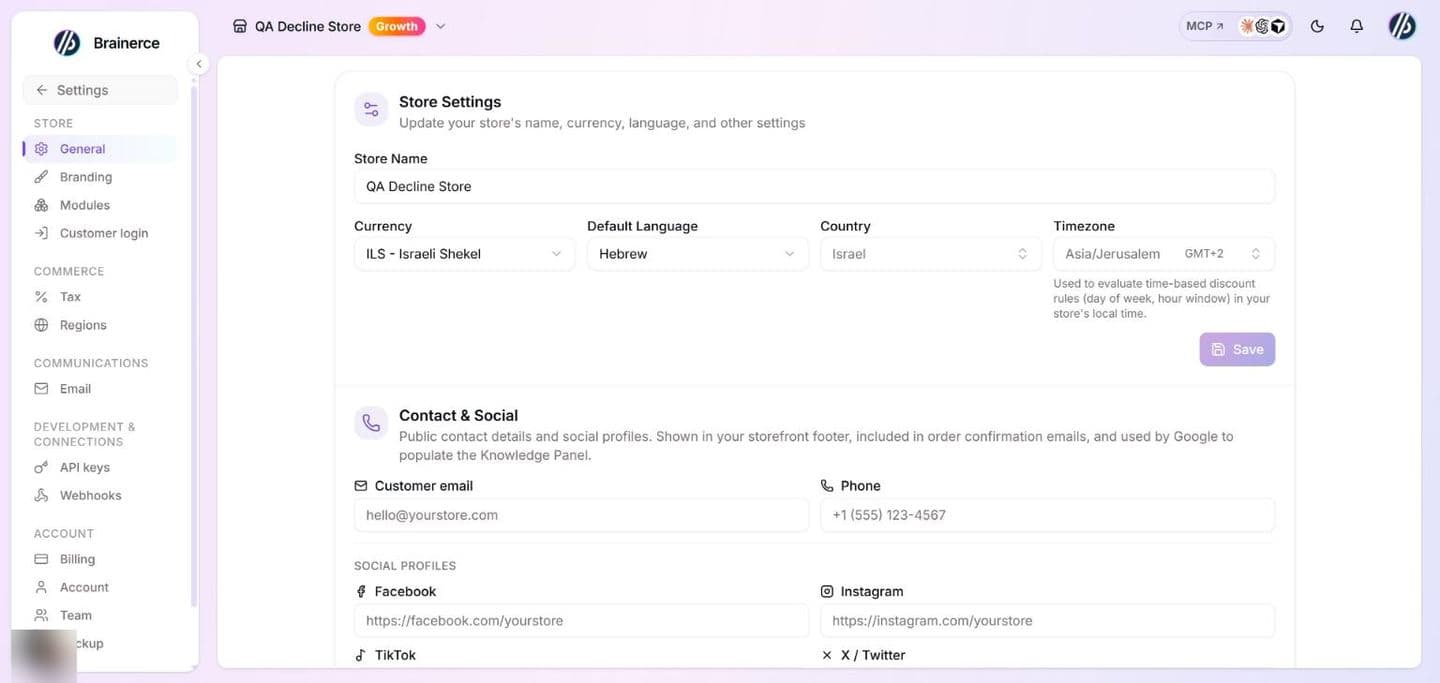
Store Settings: name, currency, language, country and timezone
| Field | What it takes | Notes |
|---|---|---|
| Store Name | 2 to 100 characters. Required. | Save stays greyed out while the name is empty. |
| Currency | One of USD, EUR, GBP, ILS, JPY, CAD, AUD. | See the warning below. |
| Default Language | One of ten languages: English, Hebrew, Arabic, Spanish, French, German, Japanese, Chinese, Russian, Portuguese. | See the warning below. |
| Country | Any country, picked from a searchable list. Optional. | Also affects which payment providers are available. Leaving it empty keeps whatever was saved before. |
| Timezone | Any timezone, picked from a searchable list that shows each one with its GMT offset. Defaults to UTC. | Used to evaluate time-based discount rules (day of week, hour window) in your store's local time. |
Make your changes and click Save. The button is greyed out until something changes.
Changing the currency relabels every price and converts nothing. A product at 100 ILS becomes a product at 100 EUR, and so does every sale price, shipping price, voucher amount and gift card balance, so set the currency before you add prices. Existing orders keep the currency they were placed in. The dropdown holds only the seven currencies above; there is no other currency to choose here. To charge shoppers in a different currency in one part of the world, see Regions and currencies.
Changing the Default Language translates nothing. Every product or category text you have not translated is simply shown as the new language. To sell in more than one language, use Multi-Language below.
Changing the timezone reloads the dashboard so that dates and times switch to the new zone straight away.
A connected AI assistant (ChatGPT, Claude, Cursor) can change every field on this page for you, currency and language included. It asks you to confirm a currency change once the store has orders, and it refuses one while a checkout is in progress. The same rules apply: changing the currency relabels every price and converts nothing, and changing the language translates nothing. See Connect an AI assistant.
Contact & Social: customer email, phone and social links
This section holds the public contact details of your business. They appear in your storefront footer and order confirmation emails, and Google uses them to build the Knowledge Panel for your business.
| Field | What it takes |
|---|---|
| Customer email | A valid email address, up to 254 characters. |
| Phone | Free text, up to 40 characters. Any local format works (03-1234567, +1 (555) 123-4567); it is not checked or reformatted. |
| Facebook, Instagram, TikTok, X / Twitter, YouTube | A full web address that starts with https:// or http://, for example https://instagram.com/yourstore. An address without the https:// start is rejected. |
Every field is optional. Clear a field and click Save to remove it; the link or contact detail then disappears from the storefront. Those five are the only social networks the form supports; there is no field for Pinterest, LinkedIn or anything else.
Click Save in this section only after you finish editing it. The button is greyed out until something changes.
Business details for documents: legal name, tax ID and address
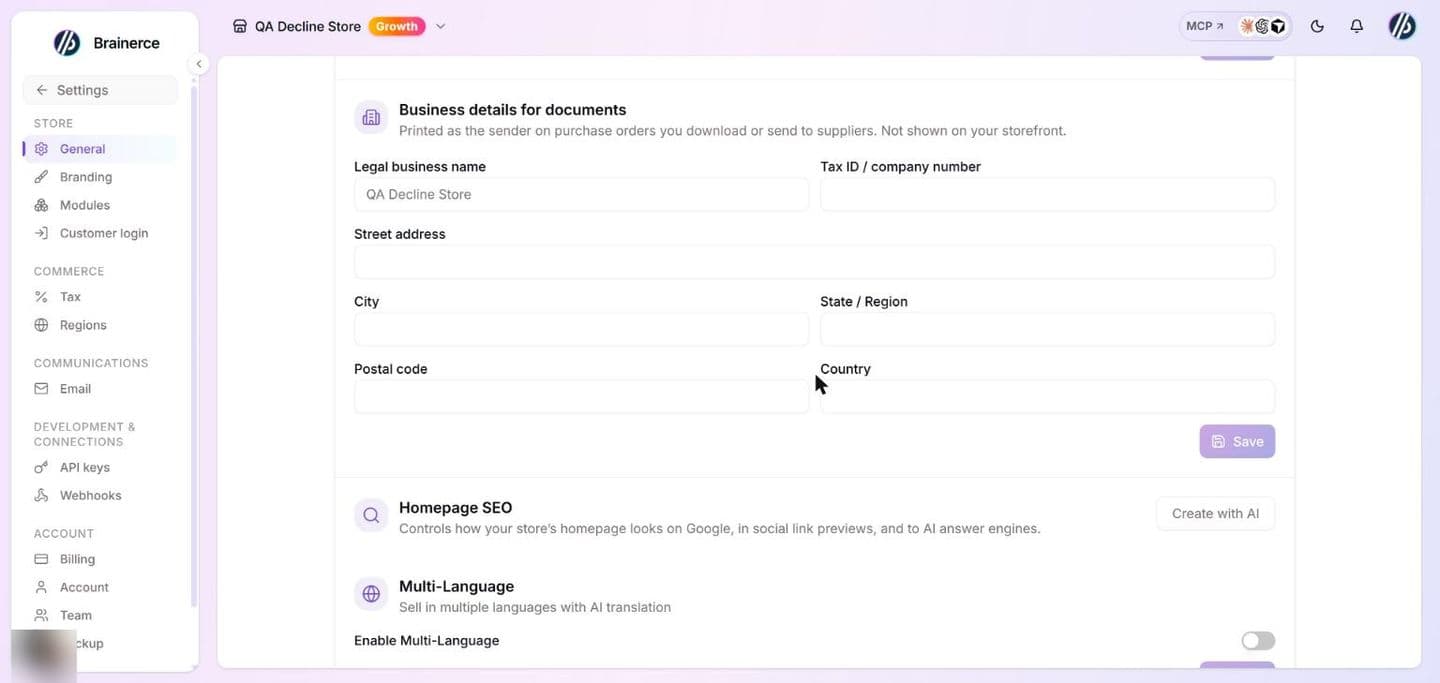
This section holds the details printed as the sender on the purchase order PDFs you download or email to a supplier.
| Field | What it takes |
|---|---|
| Legal business name | Up to 200 characters. If you leave it empty, the PDF uses your store name. |
| Tax ID / company number | Up to 50 characters. Free text; it is not checked against any registry. |
| Street address, City, State / Region, Postal code, Country | Free text. Blank lines are dropped, and an address with nothing left is cleared. |
Every field is optional. Clear a field and click Save to remove it. The section has its own Save button, greyed out until something changes.
These details are not shown on your storefront or in emails to your customers. They are used on purchase order PDFs only. Your public contact details are the ones in Contact & Social above.
Homepage SEO: the meta description
The Homepage SEO card shows your current meta description in quotation marks. Click Edit (or Create with AI when none exists yet) to open the editor.
- Meta description is the summary shown under your homepage in Google results and in link previews on Facebook, X and WhatsApp. Aim for 50 to 160 characters.
- The box stops at 160 characters, and the counter beside it reads "n/160", so you cannot type or save a longer description in this editor. This holds for every language you write one for. A description saved earlier that is longer than 160 stays as it is, with a red counter, until you shorten it. Google cuts long descriptions off anyway.
- Click Create with AI (inside the editor) to draft one, then edit it or save it as it is. It uses AI credits.
- Clear the box and Save to remove the description.
- With Multi-Language on, a language picker appears at the top so you can write one description per language.
The same editor also opens from SEO Autopilot. It is the same field in both places.
Multi-Language: add store languages
Turn on Enable Multi-Language to sell in more than one language. Turning it on shows:
- Default Language, read-only here. Change it in Store Settings above.
- Additional Languages, one row per language with its native name, English name and a progress badge (% translated): green at 100%, amber while partly translated, grey at 0%. The badge appears once you have content to translate.
- An X on each row removes that language from the list. The default language has no X and cannot be removed.
- Add Language opens a dropdown of the languages not yet on the list. The picker holds a fixed list of ten languages; you cannot add one that is not on it.
Adding or removing a language also adds or removes it from your email templates straight away, before you press Save. Pressing Save in this section is what stores the language list and the on/off switch itself.
Turning Multi-Language off hides every translation from shoppers and search engines. The translations are kept and come back when you turn it on again.
Two related settings are not on this page: Auto-translate new products and When I create content in another language are set from the AI assistant's settings. See Translate products into another language for what translates, what stays the same in every language (price, inventory, images), and why your website may still show the wrong one.
What's next?
Need a hand? Email [email protected].